前言
- 最近需要在windows上使用ffmpeg的动态库
libav*开发,编译ffmpeg得到了include/.h和.dll但是用的时候一直报链接错误,找不到符号:
sh
正在创建库 build/Debug/mediaxx.lib 和对象 build/Debug/mediaxx.exp
mediaxx.obj : error LNK2019: 无法解析的外部符号 "int __cdecl av_log_get_level(void)" (?av_log_get_level@@YAHXZ),函数 get_libav_version 中
引用了该符号 [build\mediaxx.vcxproj]
build\Debug\mediaxx.dll : fatal error LNK1120: 1 个无法解析的外部命令 [build\mediaxx.vcxproj]- 查了一下,应该是windows下还需要导入库文件
.lib,说是编译生成dll的时候会自动生成.lib和.def符号表文件,不过我没复制出来,懒得再编译就找了个从.dll直接生成.lib和.def的方法
方法
- 需要已经安装 Visual studio,然后点
任务栏-开始-visual studio/Developer PowerShell,启动这个pwsh命令行窗口: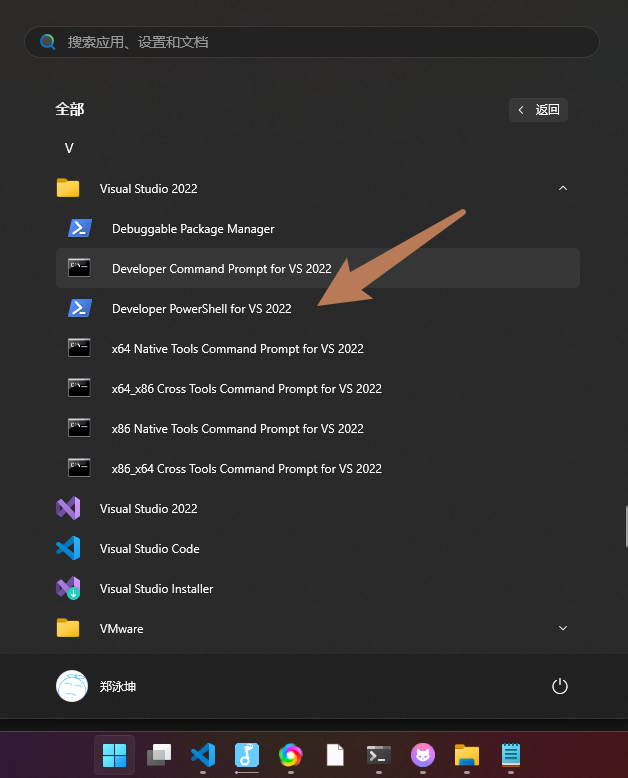
- 首先生成
def文件,也就是一个文本文件:
sh
dumpbin /exports name_xxx.dll > name_xxx.def- 它的内容一般是这样的:
txt
Microsoft (R) COFF/PE Dumper Version 14.37.32822.0
Copyright (C) Microsoft Corporation.  All rights reserved.


Dump of file .\avdevice.dll

File Type: DLL

  Section contains the following exports for avdevice-61.dll

    00000000 characteristics
           0 time date stamp
        0.00 version
           1 ordinal base
          15 number of functions
          15 number of names

    ordinal hint RVA      name

          1    0 002B8640 av_device_ffversion
          2    1 001F9C53 av_input_audio_device_next
          3    2 001F9CAD av_input_video_device_next
          4    3 001F9CB7 av_output_audio_device_next
          5    4 001F9D11 av_output_video_device_next
          6    5 001F9D1C avdevice_app_to_dev_control_message
          7    6 001FDBB6 avdevice_configuration
          8    7 001F9D37 avdevice_dev_to_app_control_message
          9    8 001F9E8D avdevice_free_list_devices
         10    9 001FDBBE avdevice_license
         11    A 001F9D4C avdevice_list_devices
         12    B 001F9F3A avdevice_list_input_sources
         13    C 001F9FD7 avdevice_list_output_sinks
         14    D 001F9C40 avdevice_register_all
         15    E 001FDBB0 avdevice_version

  Summary

      101000 .data
        E000 .pdata
       D8000 .rdata
        4000 .reloc
      1FE000 .text
1000 .tls- 按文本打开,修改刚刚生成的
def文件内容,只保留中间的符号表,且删除符号前面的东西,然后在开头添加LIBRARY和EXPORTS,最终变成:
txt
LIBRARY

EXPORTS
  av_device_ffversion
  av_input_audio_device_next
  av_input_video_device_next
  av_output_audio_device_next
  av_output_video_device_next
  avdevice_app_to_dev_control_message
  avdevice_configuration
  avdevice_dev_to_app_control_message
  avdevice_free_list_devices
  avdevice_license
  avdevice_list_devices
  avdevice_list_input_sources
  avdevice_list_output_sinks
  avdevice_register_all
avdevice_version- 然后回到命令行,生成lib文件:
sh
lib /def:name_xxx.def /machine:x64 /out:name_xxx.lib- 基本就ok了,一顿操作后就有了4个文件,其中
dll是运行时需要用的,其他文件是编译时用的:
- avcodec.dll
- avcodec.def
- avcodec.exp
- avcodec.lib- 附带一个
ffmpeg编译使用的提示:- 引用ffmpeg的libav动态库编译后报错找不到符号,可能是因为c++符号签名的问题,include ffmpeg的头文件时应当 extern "C" 包裹:
c++
// 在c++项目里不能直接 include
#include "third_part/ffmpeg/include/libavutil/log.h"

// 应当用 extern "C"
extern "C" {
#include "third_part/ffmpeg/include/libavutil/log.h"
}